By Jason, the parent who built CarpoolConnect.
I did not set out to build a carpool app. I just did not want to pay a subscription for a pile of features to get the one thing I needed, and the free way, tracking it by hand, only worked until about week three. Every season was easy to start and impossible to keep true: a kid got sick, a second activity showed up, someone swapped a Tuesday for a work trip, and before long every family was working from a different version of the schedule.
So I built one place that always had the latest version, mostly so I could see it at a glance. Other families asked for the link, then their friends did. I have built software products for a living for a long time, so I did the obvious thing: listened to the parents using it, added what they kept asking for, changed course when something did not land, and kept going. It has grown by word of mouth ever since.
It is a web app on purpose. Add it to your phone's home screen and it behaves like any other app, but there is one version, everyone is on the latest one automatically with nothing to download, and it drops your driving days into the Apple, Google, or Outlook calendar you already have.
So this post names names, and I am not neutral: CarpoolConnect is in the table. What I can promise is that it is honest. Every fact about another product was checked against that product's own website or App Store listing on September 4, 2026, and where a vendor does not say, the table says "not listed" rather than guessing. The comparison is on what decides whether a carpool tool survives past week three: whether other parents have to install anything, whether the schedule lands in their calendar for free, whether it builds a fair rotation, and what a season really costs.
First, Know Which Problem the App Is Solving
Search for "carpool app" and you get products solving four different problems under the same name. Two of them are not for you at all, and the third is only for you if you are still at the start.
- Commuter ride-matching. Adults sharing rides to work: route matching, cost splitting, strangers. Useless for deciding which parent is at the soccer field at 6:30.
- Kids' ride services and school dismissal systems. Companies that send a vetted driver, or software schools buy to run the pickup line. Different products, different buyers. Nothing in this comparison supplies drivers or runs background checks, and that includes us.
- Finding carpool families. Apps whose main job is connecting you with families nearby or at the same school. If you do not have a carpool yet, this is the category you need, and it is a different job from running one.
- Organizing the carpool you already have. You know the families. The problem is keeping four households in sync through a season of last-minute switches. That is what this post compares, plus the free manual option most of us start with.
The Comparison
Features as each vendor listed them on September 4, 2026. Prices are just below, in What a Season Actually Costs. If you spot something that has changed, tell us and we will fix it.
| App | Made for | Do other parents install anything? | Calendar sync | Fair rotation |
|---|---|---|---|---|
| CarpoolConnectthat's us | Organizing a carpool with families you already know | Nothing to install Any browser. Join from a link with an email code. No passwords, ever. | Free for everyone Apple, Google, Outlook, any webcal app. | Automatic Round robin, with split drop-off and pickup drivers. |
| Carpoolio | Sports and school families, with an AI schedule assistant | App or web iOS and Android apps, or a web version. | Paid plan Full Send plan only. | Paid plan AI schedule generator on Full Send. |
| Carpool-Kids | Carpools with friends and family, with routes that open in Maps | App required iOS and Android. No web version listed. | Paid plan Pro only. | Not listed Driver and rider stats on Pro. |
| GoKid | School carpools, sold to schools as GoKid Connect; a family app on the side | App or web iOS and Android apps, or sign up on the web. | Not listed Not stated on its site or listing. | Automatic Listing says it handles calendar, reminders, and route assignments. |
| KidsPool | Finding carpool families nearby, in verified groups | App required iOS and Android. Sign-up needs a US phone number. | Not listed | Not listed |
| Manual Calendar Invites | Calendar events one parent creates and invites everyone to, by hand | Nothing to install But one person creates every event and sends every invitation, and re-sends when anything changes. | It is the calendar Only for families who accepted the invitations. | By hand Someone types every driver into every event. |
CarpoolConnect
that's usOrganizing a carpool with families you already know
- Install?
- Nothing to install
Any browser. Join from a link with an email code. No passwords, ever.
- Calendar sync
- Free for everyone
Apple, Google, Outlook, any webcal app.
- Fair rotation
- Automatic
Round robin, with split drop-off and pickup drivers.
Carpoolio
Sports and school families, with an AI schedule assistant
- Install?
- App or web
iOS and Android apps, or a web version.
- Calendar sync
- Paid plan
Full Send plan only.
- Fair rotation
- Paid plan
AI schedule generator on Full Send.
Carpool-Kids
Carpools with friends and family, with routes that open in Maps
- Install?
- App required
iOS and Android. No web version listed.
- Calendar sync
- Paid plan
Pro only.
- Fair rotation
- Not listed
Driver and rider stats on Pro.
GoKid
School carpools, sold to schools as GoKid Connect; a family app on the side
- Install?
- App or web
iOS and Android apps, or sign up on the web.
- Calendar sync
- Not listed
Not stated on its site or listing.
- Fair rotation
- Automatic
Listing says it handles calendar, reminders, and route assignments.
KidsPool
Finding carpool families nearby, in verified groups
- Install?
- App required
iOS and Android. Sign-up needs a US phone number.
- Calendar sync
- Not listed
- Fair rotation
- Not listed
Manual Calendar Invites
Calendar events one parent creates and invites everyone to, by hand
- Install?
- Nothing to install
But one person creates every event and sends every invitation, and re-sends when anything changes.
- Calendar sync
- It is the calendar
Only for families who accepted the invitations.
- Fair rotation
- By hand
Someone types every driver into every event.
What a Season Actually Costs
Monthly prices look small until you multiply them by a season. Here is the paid tier of each app for one four-month season (four times the monthly price) and for a full year (the annual plan), using the prices listed on September 4, 2026. Where a free tier might cover you, the note says what it leaves out. Whether one paid account covers the whole group or each family pays separately varies by app and is not always stated, so check before you buy.
| App | One season | One year |
|---|---|---|
| CarpoolConnectNo. Use when neededOnly the organizer pays, and only for the seasons you actually use it. Nothing renews, no surprise charges. | $9.99 | $19.99 |
| CarpoolioAutomaticallySubscription ($6.99/mo). Free tier: one carpool, no calendar sync, no schedule generator. | $27.96 | $34.99 |
| Carpool-KidsAutomaticallySubscription ($4.99/mo). Free tier has no calendar sync. | $19.96 | $24.99 |
| GoKidAutomaticallySubscription ($4.99/mo). Free core app; Pro adds live tracking, carpool history, and chat. Free for parents invited through a school. | $19.96 | $49.99 |
| KidsPoolAutomaticallySubscription ($7.99/mo). | $31.96 | $69.99 |
| Manual Calendar InvitesNot applicableYour time is the cost. | Free | Free |
Every paid tier except ours renews on its own. Carpooling is seasonal: you set it up in September, use it until November, and pick it back up in March. A subscription that keeps billing through the months your team is not practicing is the wrong shape for that, which is why ours is a pass with an end date instead. You buy it for the seasons you need, and there is nothing to cancel. Split four ways, a $9.99 season is about $2.50 a family, less than a cup of coffee, and one pass covers every carpool you run, not one fee per carpool.
What Each One Is Good At
Carpoolio
The most fully featured of the kids' carpool apps: built for sports and school families, with an AI assistant that fills in a season's driving around driver constraints, live trip tracking, and connections to team apps. It runs on iOS, Android, and the web. The catch is that the schedule generator, calendar sync, and tracking all sit on the paid plan, and the free tier stops at one carpool. If you want the most features and are happy to subscribe, it is a strong choice.
Carpool-Kids
A long-running app for carpooling with friends and family, with routes that open in Maps and event importing from team apps. It is app-only (iOS and Android). Calendar sync is a Pro feature, and the site does not describe an automatic rotation, so the organizer is still deciding who drives when. Geared more toward routes than toward turn-taking.
GoKid
One of the oldest names in school carpooling. Its main product, GoKid Connect, is sold to schools and districts; the family app is the version parents use on their own, on iOS, Android, or the web, with invited families only. The core app is free, and a Pro subscription adds live vehicle tracking, carpool history, and chat. Parents invited through their school get it free. If your carpool is really a school run across town, it is built for that shape.
KidsPool
A community carpool planner: you sign up with a US phone number and can collaborate with families nearby in verified groups, with live ride tracking. Its listing does not mention calendar sync or a driver rotation. This is the one to look at if your problem is finding families, not organizing them.
Manual calendar invites
Free and familiar, and for three families with a fixed schedule it works. One parent creates an event for every practice in Apple, Google, or Outlook, invites every family, and fixes each swap by hand, then hopes everyone accepts the update. A two-practice-a-week season is 25 to 30 events, each with its own invitation list. This is the manual baseline the rest of the list is trying to beat.
Where CarpoolConnect Fits
Most of the apps above are either a bigger product than a parent carpool needs (routes, tracking, matching, an assistant) with a subscription to match, or they are the free manual option that puts all the work on one organizer. CarpoolConnect is the step in between. It assumes you already know your carpool families, and it solves the part that actually goes wrong: keeping everyone in sync through a real season.
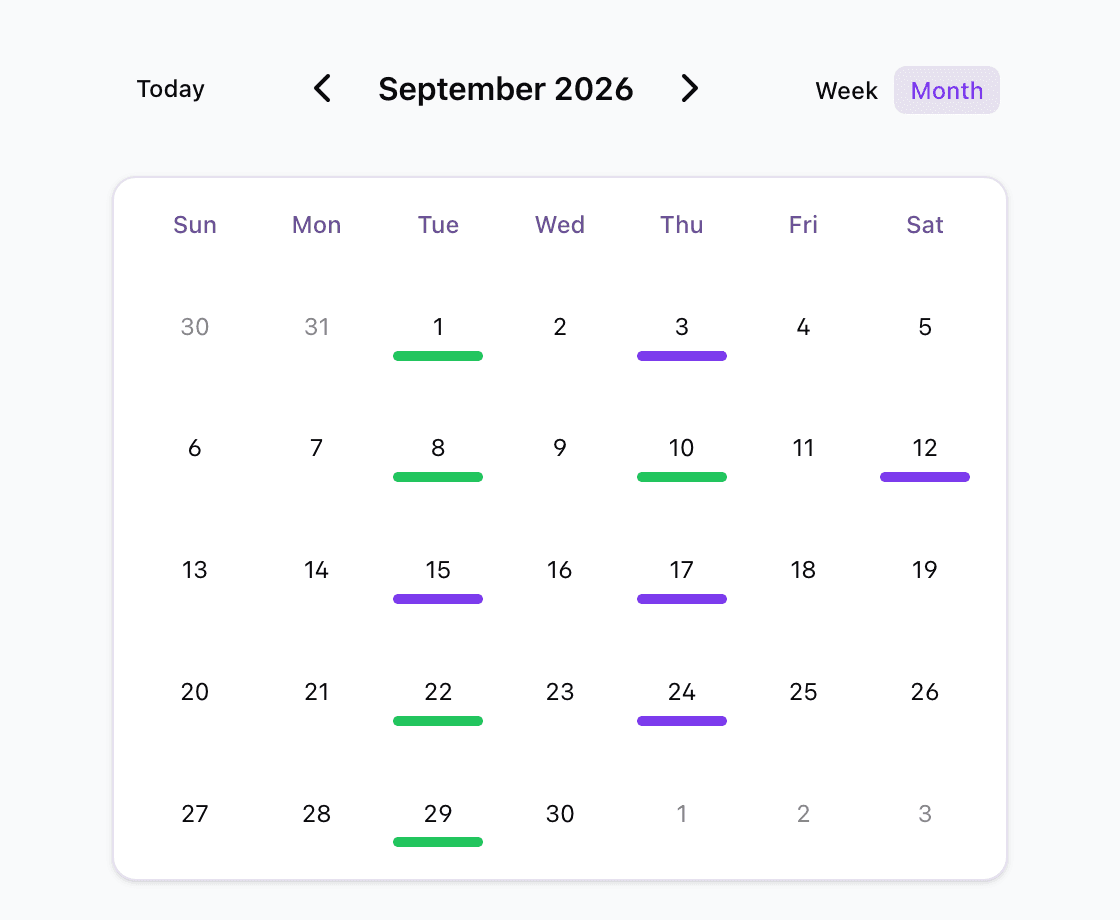
- A last-minute driver switch. Swap the driver on that day and every family sees the change. Any member can make the edit, not just the organizer.
- A kid who is out on Tuesday. Mark them not riding for that day, so the driver knows who is actually in the car.
- An extra practice or a moved game. Add the one-off event to the schedule instead of starting a new text thread.
- Different drivers for drop-off and pickup. The rotation can split the two, and both show up on the calendar.
- Everyone's calendar staying current. Each family subscribes their own Apple, Google, or Outlook calendar once, free, and it updates itself from then on.
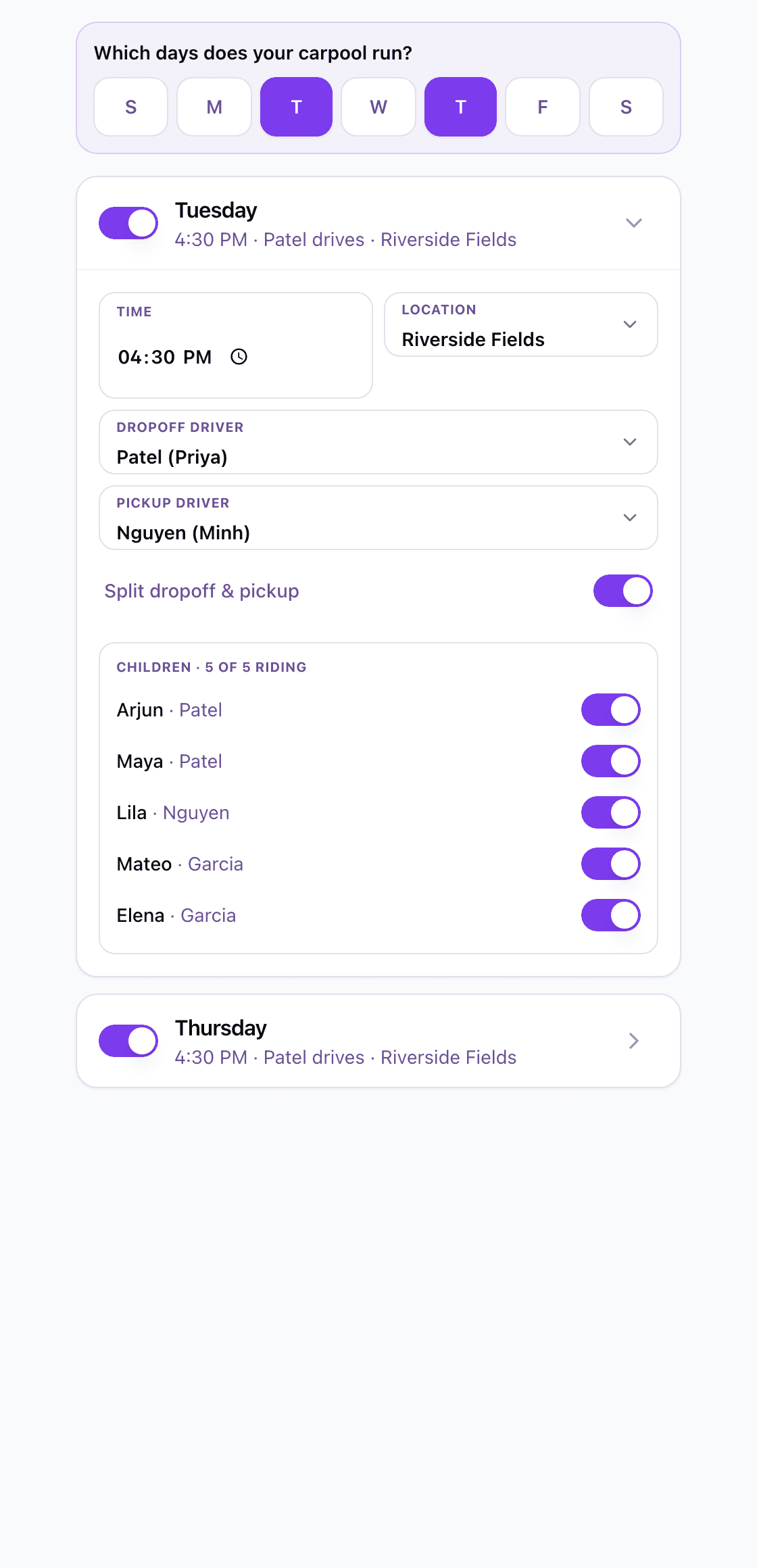
You can also try the whole thing before giving us anything. Build the carpool, add the families and kids, pick the days, and look at the rotation it produces, with no account and no email. When it does what you need, enter your email, confirm a one-time code, and share the link with your group. There are no passwords at any point, for you or for the families you invite. Only the organizer pays, $9.99 for a four-month season or $19.99 for a year, and it does not renew. Because it is a web app, nobody installs anything and everyone is always on the current version.
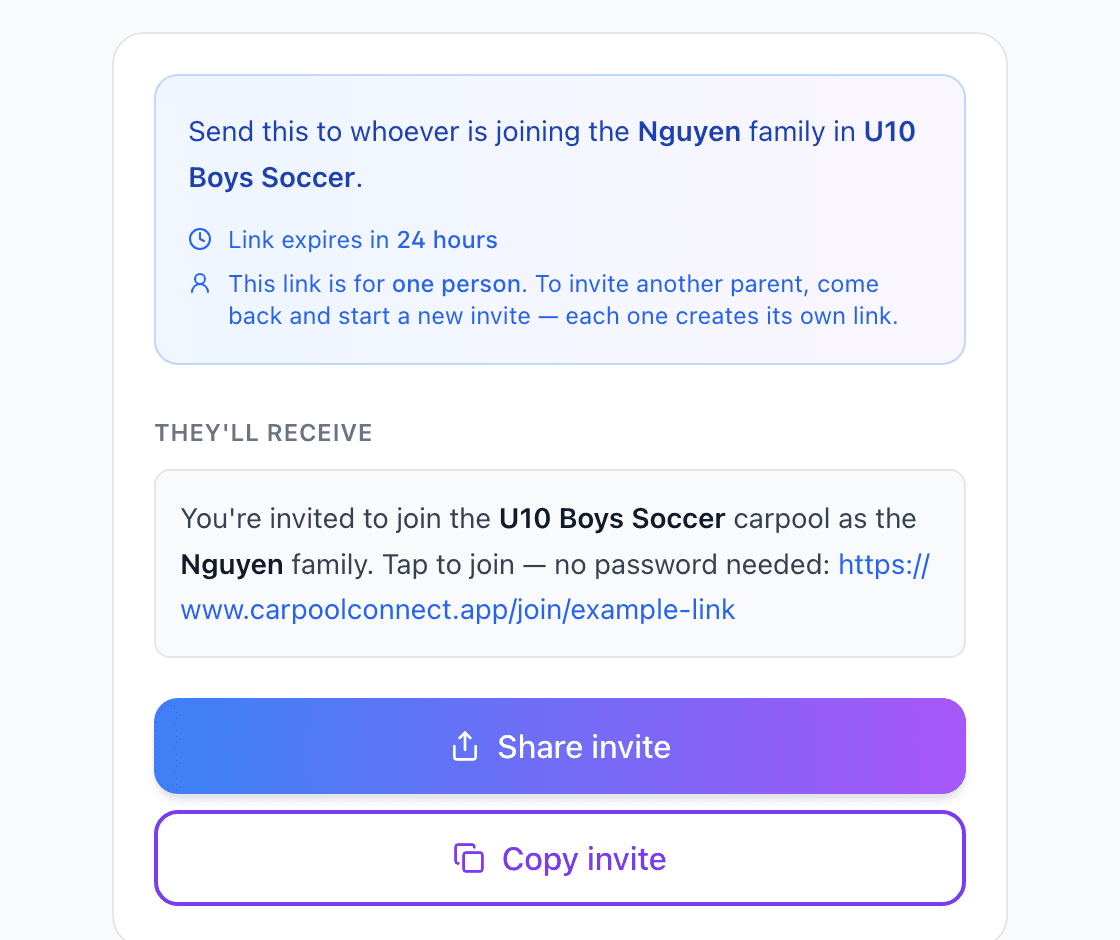
What sets it apart
- No passwords, ever. You and every family you invite sign in with a 6-digit code sent to your email. Nothing to create, nothing to forget, nothing to reset.
- Build it and see it before you hand over anything. Add the families and kids, pick the days, and look at the rotation it produces without an account or an email. About two minutes. You give us an email only when you want to save and share it.
- Sharing with the families is one link and costs them nothing. They tap it, confirm their email, and they are in. No app to download, no account to build, and nothing to pay. Ever.
- A read-only link for the grandparent or the babysitter. The organizer can turn on a share link that shows the schedule to someone who is not in the carpool at all: no account, no membership, and no children's names on it. Turn it off when the week is over.
- One fee covers every carpool you run. Soccer on Tuesday, swim on Thursday, the school run in between. One pass, not one per carpool.
- Split four ways, it is coffee money. A $9.99 season across four families is about $2.50 each. Most carpools just have the organizer collect it once.
What it does not do, on purpose: GPS tracking, in-app chat, ride matching, or driver vetting. If you need those, one of the apps above has them.
The Four Things That Actually Decide It
Whether the other parents have to install anything
This is the single most important thing. You know the parent on your team who barely checks the group text. They are not downloading an app, creating an account, and setting up a profile. Look at the install column of the comparison. If your group includes even one reluctant parent, that column decides it.
Whether the schedule lands in their calendar, free
If the carpool schedule syncs to my phone's calendar, I see it alongside everything else in my life and I get reminders. If it only lives inside an app, I will forget to check it. That is not a personal failing; it is how phones work. Two of the purpose-built kids' carpool apps charge for calendar sync, so ask whether the free tier includes it before you invite anyone. We wrote a whole post on how CarpoolConnect's Calendar Sync works.
Whether it builds a fair rotation or leaves you to type one
Asking "who can drive this week?" sounds democratic but recreates the group text problem: the most available parents drive the most. A rotation assigns drivers fairly by default and lets families swap when they need to. If you just want the rotation itself, our free carpool schedule generator will print one with no signup at all.
What it costs, and who pays
See the season table above. Also ask who pays. If every family needs a paid account, you are asking five households to spend money on something one person could set up. The models that work are a free tier that does what you need, or one organizer paying a one-time seasonal fee. Ours is on the pricing page.
Features That Sound Good but Don't Matter
- In-app messaging. Every parent already has a texting app. Nobody wants another inbox. Let the app handle the schedule and let people text each other.
- GPS tracking. Several apps here offer live location of the driver. For a parent you know personally driving your kid five minutes to the field, it is more than you need, and it adds privacy questions to a simple arrangement. Reasonable people disagree on this one, so it is in the comparison for you to weigh.
- Routes. Route planning matters for a school run across town with pickups at six houses. For a team carpool where everyone meets at the field, it is a feature you are paying for and never opening.
Summary Remarks
For a simple three-family carpool with a schedule that never changes, manual calendar invites might be all you need. They are free, everyone knows how to accept one, and they show up on your phone.
If you still need to find families, look at KidsPool. If you want the most features and do not mind a subscription and an app for everyone, look at Carpoolio. If your carpool is really a school run with routes, look at GoKid or Carpool-Kids. If you already know your families and the problem is keeping them in sync without anyone installing anything or paying monthly, that is what CarpoolConnect is for.
Frequently Asked Questions
What is the best carpool app for parents?
It depends on what you are missing. For a tiny carpool that never changes, manual calendar invites are enough. If you still need to find families to carpool with, KidsPool is built around connecting families nearby. If you already have your families and the problem is keeping everyone in sync, CarpoolConnect is built for exactly that: a fair rotation, free calendar sync for every family, and nothing for anyone to install. Carpoolio, Carpool-Kids, and GoKid are the other apps made specifically for kids' carpools, each with its own strengths noted above.
Are carpool apps free?
Most have a free tier, and the paid tiers are almost all monthly or yearly subscriptions: Carpoolio $6.99/month or $34.99/year, Carpool-Kids Pro Family $4.99/month or $24.99/year, GoKid Pro $4.99/month or $49.99/year, KidsPool $7.99/month or $69.99/year, as listed on September 3, 2026. CarpoolConnect is free to join, and only the organizer pays, once: $9.99 for a 4-month season or $19.99 for a year, with no auto-renewal.
Can I try a carpool app before creating an account?
With CarpoolConnect, yes, fully. You build the whole carpool, add the families and kids, set the days, and see the rotation it produces without creating an account or entering an email. You enter an email and confirm a one-time code only when you want to save it and share it with your group. There are no passwords at any point.
Do other parents have to download an app to join a carpool?
With CarpoolConnect and manual calendar invites, no. Carpoolio and GoKid offer a web version alongside their apps. Carpool-Kids and KidsPool list only iOS and Android apps.
Which carpool apps sync to Apple or Google Calendar for free?
CarpoolConnect includes calendar sync free for every member of the carpool. Carpool-Kids and Carpoolio put calendar sync behind their paid plans. GoKid and KidsPool do not state it on their sites or listings.